


Content:
- Connection conditions
- How to enable integration
- How to set up an appointment with doctors and services
You can connect an appointment in Medflex both to your doctors and to the service through an insurance company. The record will be sent to the clinic's MIS.
List of available insurance companies:
- AlfaStrakhovanie
- VSK
- Zetta
- Ingosstrakh
- CAPITAL OF LIFE
- Rays (formerly BestDoctor)
- The leak
- Renaissance insurance
- RESO-Warranty
- Rosgosstrakh
- Sberbank Insurance
- Sovcombank
- Sogaz
- Approval
- IBG Insurance Business Group

Connection conditions 
- The clinic must have an agreement with the insurance company.
- The clinic must notify the insurance company about the connection.
- The clinic should set up an appointment with doctors and for services that are available under the VMI. All other doctors and services should be turned off in the settings for integrations with insurance companies.
Important! According to the agreement, Medflex connects the clinic to the insurance company once. If the clinic then turned off the online record from the insurance company, then it reconnects on its own.
How to enable integration
1. Go to the section«Магазин интеграций».

2. Select the required insurance company

3. Click «Подключить».

How to set up an appointment with doctors and services
1. Go to the integration settings.

2. On the page that opens, turn off the appointment for doctors, to whom the insurance company will not be able to make an appointment for the patient.
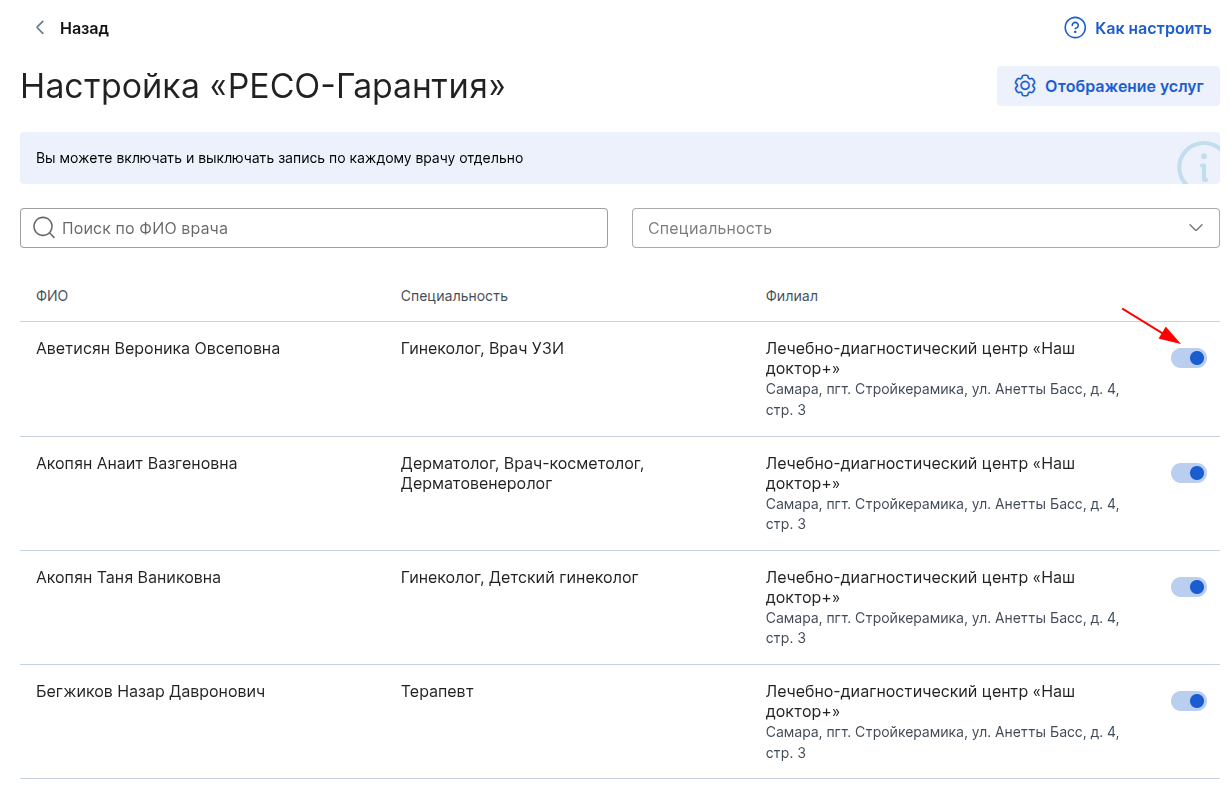
3. To set up an online account for services, open the tab«Настройка услуг из МИС».

Important: under no circumstances can insurance companies sign up a patient for a service that requires prior medical advice.
Since online clinic appointments are paid for by the insurance company, insurance records are not displayed in the detailed report in the personal account of Medflex. To get statistics on the records, you need to contact the insurance company.