


Content:
- How to enable integration
- Configuring the display of services
- Updating the price list for 2GIS
- If prices are not displayed
After the integration is installed in 2GIS, the clinic card will display services with prices.
How to enable integration 
- Log in to your Medflex personal account using the username and password from your personal account ProDoctorovand go to «Магазин интеграций».
How to create a personal account on ProDoctorovread the article - How to register a clinic on the portal. - Select «Прайс-лист на 2ГИС»it in the block «Выгрузка цен»and click on integration.
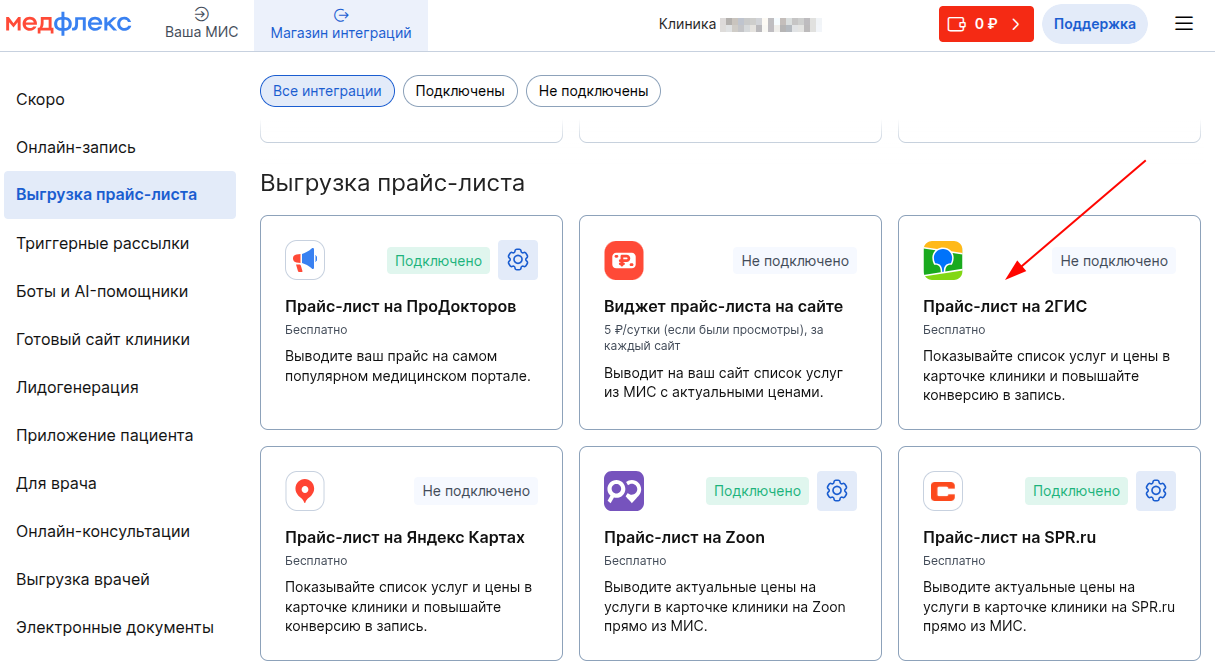
3. On the page that opens, click «Подключить»at the top right.

Configuring the display of services
To enable or disable the services in the DOCTA price list, make the settings on the Configure Services from MIS page.
Updating the price list for 2GIS
The price list is updated once every 24 hours, but it is likely to happen earlier.
If prices are not displayed
We recommend contacting support goods@2gis.ru .